DPI vs PPI: Key Differences Easy Guide
Published: 20 Mar 2025
When working with pictures or images, the resolution is very important because it decides how clear and sharp the image looks, whether it’s on a screen or printed on paper. Two common words that people often mix up are DPI (Dots Per Inch) and PPI (Pixels Per Inch). Even though both talk about how clear an image looks, they are used for different things.

DPI is mostly used for printing, and it controls how detailed an image will look on paper. PPI, on the other hand, is used for digital screens like phones or computers, and it shows how sharp the image looks on the screen. Knowing the difference between DPI vs PPI helps you choose the right settings for printing, designing, and digital displays.
This article will explain the main differences between DPI and PPI, where they are used, and how they affect image quality.
Quick Comparison Table: DPI vs PPI
This table provides a quick and clear comparison of DPI vs PPI!
| Feature | DPI (Dots Per Inch) | PPI (Pixels Per Inch) |
| Definition | Measures print resolution (dots per inch in printed material). | Measures screen resolution (pixels per inch on a display). |
| Used In | Printing (printers, scanners, physical media). | Digital screens (monitors, smartphones, images). |
| Impact On | Print quality and sharpness. | Screen resolution and image clarity. |
| Measurement Unit | Dots per inch (physical ink dots). | Pixels per inch (digital display pixels). |
| Adjustability | Can be changed when printing for better quality. | Set by screen hardware; cannot be changed manually. |
| Higher Value Means | More detailed prints with smoother edges. | Sharper, more detailed screen images. |
| Best For | Printers, posters, and physical artwork. | Digital displays, web images, and photography. |
Differences between DPI and PPI
Here is the list of key comparisons below.
- Definition
- Application
- Measurement and Units
- Impact on Image Quality
- Adjustability and Scaling
- Common Misconceptions
Let’s break down all the key differences in detail and help you decide which is the best.
1. Definition
DPI and PPI both tell us about the clearness of a picture, but they mean different things. DPI is used for printing on paper, and PPI is used for pictures on digital screens like phones or computers.
DPI (Dots Per Inch)
DPI means how many tiny dots are printed in one inch of a picture on paper. It helps decide how clear and sharp the picture will look when printed. If the DPI number is higher, the picture looks smoother and more detailed. It is used in printers and scanners to make good-quality prints. Most printers use around 300 DPI for clear prints and 600 DPI for very high-quality or professional prints.
PPI (Pixels Per Inch)
PPI means how many tiny pixels (small dots of colour) are shown in one inch on a digital screen. It helps decide how clear and sharp a picture looks on a phone, computer, or TV screen. When the PPI number is higher, the picture looks brighter, smoother, and more detailed. It is used in mobiles, monitors, and digital pictures. Most screens use around 72 PPI for normal web pictures and 300 PPI for high-quality or HD images.
2. Application
DPI and PPI are used in different fields based on their impact on image quality.
DPI Applications
DPI is very important when printing pictures or documents. It helps make sure the printed image looks clear and sharp. People use it when making posters, magazines, or photo prints. It also helps to check how good a printer is and to keep the picture quality high when it is printed on paper.
PPI Applications
PPI is used for pictures and designs on screens like computers, phones, and tablets. It helps make the images look clear and sharp when seen online. People use it for digital drawings, social media posts, and websites. A higher PPI makes pictures look better on big or high-quality screens, and it also helps make games and videos look more real and detailed.
3. Measurement and Units
DPI and PPI are measured differently based on their respective technologies.
DPI Measurement
DPI means dots per inch, and it shows how many tiny dots a printer puts in one inch when printing a picture. You can change the DPI in the printer settings. A higher DPI makes the picture look smooth and clear, while a lower DPI can make it look blurry or blocky.
PPI Measurement
PPI means pixels per inch, and it shows how many tiny dots (pixels) you can see on a phone, computer, or tablet screen. It helps decide how clear and sharp a picture looks on the screen. A higher PPI makes pictures look smooth and detailed, while a lower PPI can make them look blurry or blocky.
4. Impact on Image Quality
DPI and PPI influence image quality differently depending on their usage.
How DPI Affects Image Quality
DPI affects how clear and detailed a picture looks when it is printed on paper. A high DPI makes the picture look smooth and sharp, showing all the tiny details and colors nicely. A low DPI can make the picture look blurry or blocky. For professional printing, people usually use 300 DPI, while newspapers often use around 150 DPI because their paper cannot show very fine details.
How PPI Affects Image Quality
PPI decides how clear and sharp a picture looks on a computer or phone screen. When the PPI is high, the picture looks smooth and detailed, showing everything nicely. When the PPI is low, you can see the tiny squares (pixels), and the picture may look blurry or rough. High-quality screens, like Retina displays, use a high PPI to make images look extra clear. For web pictures, people often use 72 PPI so the images can load faster on websites.
5. Adjustability and Scaling
Both DPI and PPI can be changed or adjusted, but they affect different parts of how clear and detailed a picture looks.
Adjusting DPI
You can change DPI in your printer settings to make your pictures look better. When you increase the DPI, your prints look clearer and sharper. If you lower the DPI, it can save ink, but the print might look blurry or less detailed. To get the best results, you should use high-quality pictures. Professional printers use special DPI settings to make sure every print looks clean and bright.
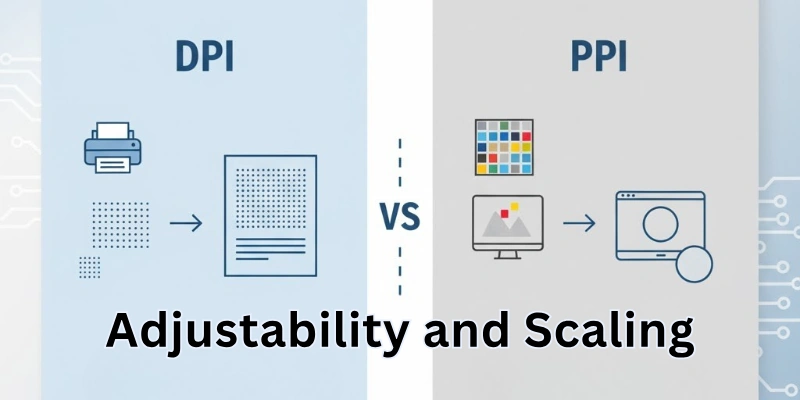
Adjusting PPI
You can set the PPI when you create or edit an image. If an image has a higher PPI, it will look clear and detailed, but it will also take up more space on your device. Images with lower PPI load faster, but they may look blurry or less sharp. Changing the PPI doesn’t change how it prints unless you resize the picture. To make images bigger without losing quality, you need a high PPI from the start.
6. Common Misconceptions
Many people confuse DPI and PPI due to their similar-sounding names.
Misconceptions About DPI
Many people get confused about DPI. DPI does not change how a picture looks on a screen, it only matters when you print it. A high DPI doesn’t always make a picture look better if the original image isn’t clear. If you try to increase DPI on a blurry or low-quality picture, it won’t make it sharper. DPI and PPI are different things, even though both talk about resolution. Also, printer DPI and screen PPI are not connected to each other.
Misconceptions About PPI
Many people also get confused about PPI. PPI does not change how a picture prints unless the image size is changed. If you increase the PPI of a low-quality picture, it won’t make it look better. Even if an image has high PPI, it can still print badly if the printer’s DPI is low. PPI only affects how clear and sharp an image looks on a screen, not on paper. Screens with high PPI, like 4K displays, show sharper pictures, but this doesn’t make printed photos better.
Choosing the Right Resolution
Choosing the right DPI or PPI depends on how you want to use the picture.
Choosing the Right DPI
When choosing the right DPI, it’s important to think about what you’re printing. For high-quality photos, use 300 DPI so the picture looks clear and sharp. For professional or business printing, use 600 DPI for even better detail. If you’re printing big posters or banners, 150 DPI works fine because people view them from far away. 72 DPI should only be used for web or screen images, not for printing. Remember, a higher DPI won’t help if the original picture is low quality.
Choosing the Right PPI
When choosing the right PPI, it depends on where the image will be used. For web pictures and online designs, 72 PPI is good because it loads fast. For presentations or digital documents, 150 PPI gives better clarity. If you’re making high-quality digital artwork, use 300 PPI for sharp and clear details. Very high PPI like 400 to 600 works best for super clear screens such as 4K or Retina displays. Lowering the PPI can make the file smaller, but it won’t change how it prints.
Conclusion
DPI and PPI are both very important for deciding how clear an image looks, but they are used in different ways. DPI is used for printing, helping pictures look sharp and clear on paper. PPI is used for screens, making images look bright and detailed on computers, phones, and tablets. Knowing the difference between DPI and PPI helps people make pictures look their best, whether they are used online or printed out.
By picking the right DPI for printing and the right PPI for digital use, you can make sure your images always look clean and high-quality. When you understand how to change and use these settings, it becomes easier to make your photos, designs, and graphics look great on both screens and paper.
FAQs about DPI and PPI
Here are some of the most FAQs related to DPI and PPI.
No, PPI and DPI are different measurements. PPI is for screens, while DPI is for printing, so they cannot be directly converted.
For high-quality photo printing, 300 DPI is recommended. Professional prints may use 600 DPI or higher for extra detail.
No, DPI only affects print quality. Increasing DPI in a digital image will not change how it appears on a screen.
The image may appear blurry or pixelated because 72 PPI is too low for high-quality printing.
Yes, high PPI screens display sharper images with finer details, improving overall visual quality.
600 DPI provides finer details, but 300 DPI is usually sufficient for most professional prints.
72 PPI is used for web images to keep file sizes small while maintaining good on-screen quality.
PPI affects digital images, but for printing, DPI and image resolution are more important.
DPI measures print quality, while resolution refers to the total number of pixels in an image.
You can adjust DPI settings in your printer software or image editing programs like Photoshop.


- Be Respectful
- Stay Relevant
- Stay Positive
- True Feedback
- Encourage Discussion
- Avoid Spamming
- No Fake News
- Don't Copy-Paste
- No Personal Attacks
- Be Respectful
- Stay Relevant
- Stay Positive
- True Feedback
- Encourage Discussion
- Avoid Spamming
- No Fake News
- Don't Copy-Paste
- No Personal Attacks
